
Remote Monitoring & Diagnostics
Luminous, a leading brand in the power and energy solutions industry, offers innovative solutions for monitoring and managing solar inverter performance. The Luminous Dongle and its associated WiFi app are tools designed to provide users with real-time insights, enabling efficient operation and management of their solar energy systems. Here’s a detailed explanation of these tools:
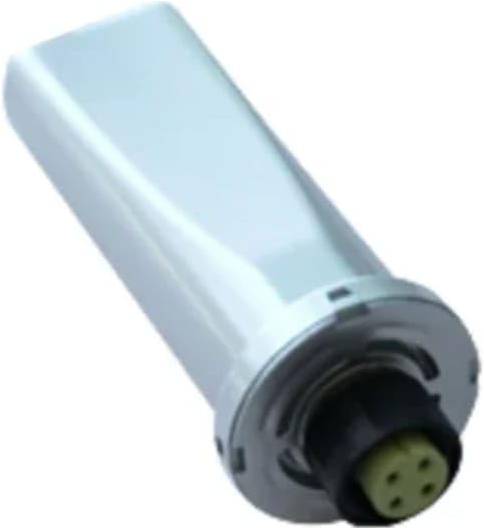
Luminous Dongle
The Luminous Dongle is a compact and smart device that connects to your solar inverter. It acts as a bridge between your inverter and the internet, enabling remote monitoring and management of your solar energy system.
Key Feature
- Plug-and-Play Design : The dongle is designed for easy installation, usually connecting via a dedicated port on the inverter.
- Real-Time Data Collection : It collects performance data from the inverter, including energy production, battery status, and system health.
- WiFi Connectivity : The dongle connects to your home or office WiFi network to transmit data to the cloud, making it accessible via the app.
- Compatibility : Designed to work seamlessly with Luminous solar inverters, ensuring optimal performance and accurate data reporting.
Benefits
Luminous WiFi App
The WiFi app, paired with the dongle, is the user interface that allows you to access and analyze data from your solar inverter. Available for both Android and iOS platforms, it provides a comprehensive dashboard for monitoring your solar system’s performance.
Key Feature
- Real-Time Monitoring : View live data on energy generation, consumption, and battery status.
- Performance Metrics : Analyze historical data to track energy production trends and system efficiency over time.
- Alerts and Notifications : Receive instant alerts for system faults, low battery levels, or maintenance needs.
- User-Friendly Interface : A clean, intuitive dashboard with detailed charts and summaries.
- Remote Access : Monitor your solar system from anywhere in the world as long as you have an internet connection.
- Eco-Friendly Insights : Helps track carbon savings, giving users a tangible sense of their environmental contribution.
Steps to Use the App:
- Download and Install: : Get the app from the Google Play Store or Apple App Store.
- Set Up Account: Register with your email or phone number and create an account.
- Connect to Dongles : Pair the app with your Luminous dongle by entering the device credentials or scanning a QR code.
- Monitor and Analyze : Access real-time and historical data to ensure your solar system is operating efficiently.
How the Combination Works
The Luminous Dongle communicates with the solar inverter to gather operational data and sends it to the cloud via WiFi. The app then retrieves this data and presents it in an easily understandable format. This seamless integration enables users to:
Why Choose Luminous Dongle and WiFi App?
- Convenience : The ability to monitor your solar inverter remotely reduces the need for manual checks.
- Enhanced Performance: Regular monitoring ensures that your system operates at peak efficiency.
- Proactive Maintenance: Early detection of issues minimizes downtime and repair costs.
- Sustainability Focus: The app's environmental tracking features encourage users to stay committed to green energy solutions.
By combining advanced technology with user-friendly tools, the Luminous Dongle and WiFi app empower users to make the most of their solar energy systems, ensuring long-term reliability and cost savings.
Detailed Analysis Tools in the Luminous App
-
Energy Generation Reports :
- Graphical representation of energy production over time
- Comparative analysis of different time periods to assess system efficiency.
-
Consumption Patterns:
- Insights into energy usage behavior.
- Breakdowns by time of day, allowing users to identify peak usage hours.
-
Environmental Impact Metrics:
- Displays the amount of carbon offset through solar usage.
- Provides equivalent metrics (e.g., trees planted or reduced vehicle emissions).
-
Fault Diagnosis:
- Identifies issues with the inverter or solar panels.
- Provides troubleshooting steps and customer support contact.
-
Efficiency Analysis:
- Calculates the system’s performance ratio (actual vs. theoretical output).
- Highlights areas for optimization, such as shade reduction or panel cleaning.
Integration with Smart Devices
Benefits of Using the Luminous Monitoring App
-
Improved System Efficiency :
- Real-time data helps in quick identification and resolution of inefficiencies.
-
Cost Savings :
- By monitoring consumption and solar production, users can reduce dependency on grid electricity.
-
Ease of Maintenance :
- Timely alerts ensure proper system maintenance and longevity.
-
User-Friendly Interface :
- Intuitive design for users of all technical skill levels.
How to Get Started
-
Download the App :
- Available on Google Play Store and Apple App Store.
-
Pair with Your Inverter :
- Use Bluetooth or Wi-Fi to connect the app with the inverter
- Ensure your inverter model is compatible with the app.
-
Set Up an Account :
- Register with your email or phone number
- Link your solar system to access performance data.
-
Customize Settings :
- Choose preferred notification types and report formats.
- Set thresholds for alerts.
Advanced Analytics Options
For users requiring more detailed insights, Luminous might also offer web-based dashboards with advanced data visualization tools. These could include:
Let me know if you need further guidance on using the app or troubleshooting connectivity issues!